
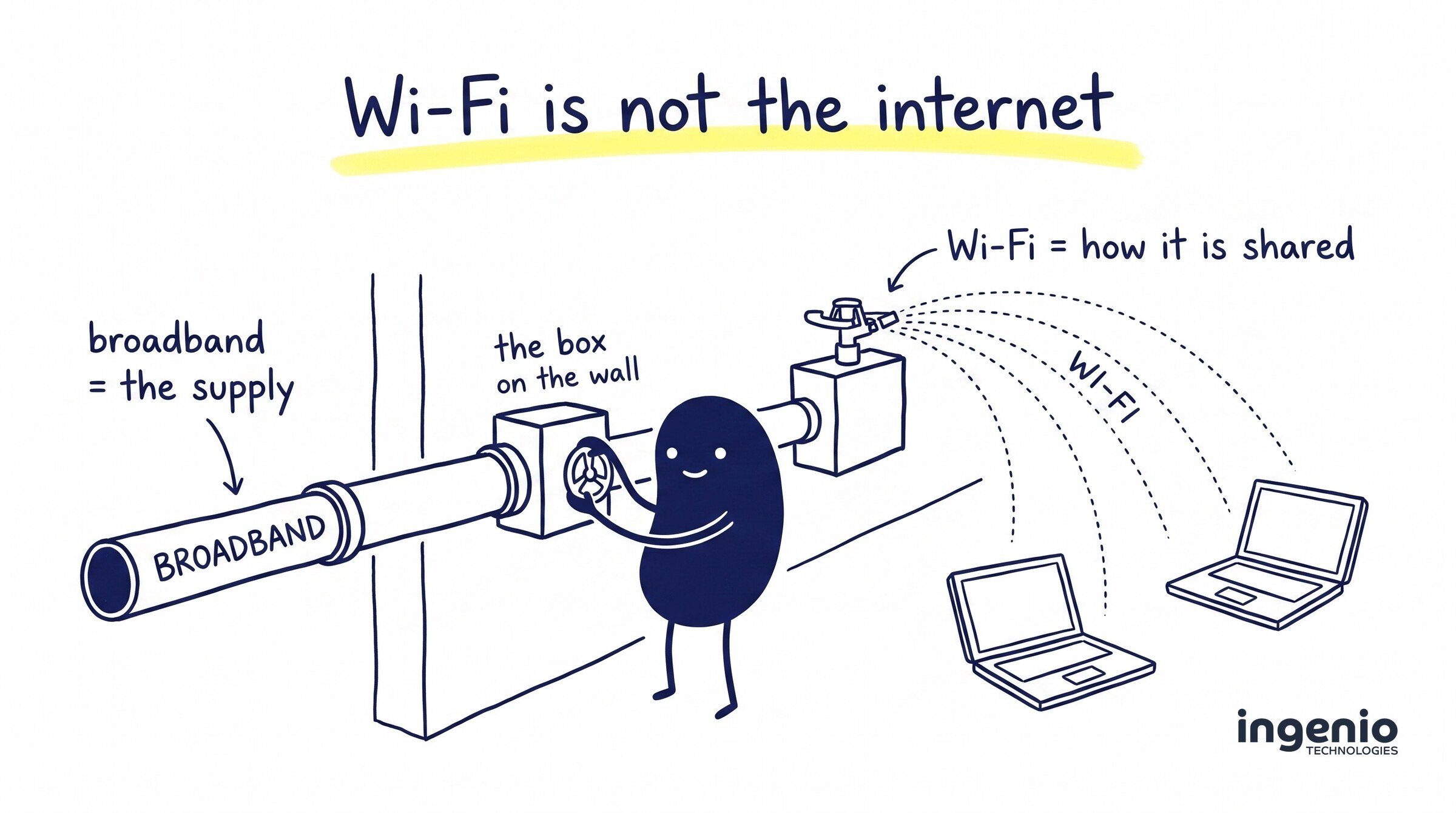
Wi-Fi is not the internet. It feels like it should be, because for most of us, typing a password into a laptop is the moment the internet starts working. But they are two different things doing two different jobs, and mixing them up leads businesses to buy the wrong upgrades, blame the wrong suppliers and put up with slow connections that are entirely fixable.
This mix-up is one of the most common we come across, and it tends to surface at the worst possible moment: when a business is moving office and ordering connectivity for the new building. So here is a plain English guide to the difference between internet, broadband and Wi-Fi: how your office internet works end to end, and how to get a fast, reliable connection to every desk.
Broadband and WiFi are not the same thing
Here is the short version. Broadband is the actual internet connection: the physical connection that brings the internet into your home or office from the outside world. WiFi is the wireless technology that shares that connection around the building once it has arrived.
New to this? Two quick definitions
What is broadband?
Broadband refers to the high-speed internet connection that comes into your building through a physical line, supplied by an internet service provider. It exists whether or not anything inside your office is switched on.
What is Wi-Fi?
Wi-Fi uses radio waves to carry data between your router and your devices over the last few metres. If broadband is the water main into the building, this is the sprinkler system that spreads the supply around.
A useful test: unplug your router and the Wi-Fi vanishes, but the supply is still there, coming into your home or office at the wall. And when your provider has an outage, your Wi-Fi network keeps broadcasting quite happily; there is simply no internet behind it.
For your business
Understanding the difference between broadband and Wi-Fi saves real money. You will know what you are actually buying, and when things slow down you will know which half of the system to fix. In short: broadband connects you to the internet; Wi-Fi connects your devices to your broadband.
How broadband reaches your building in the UK
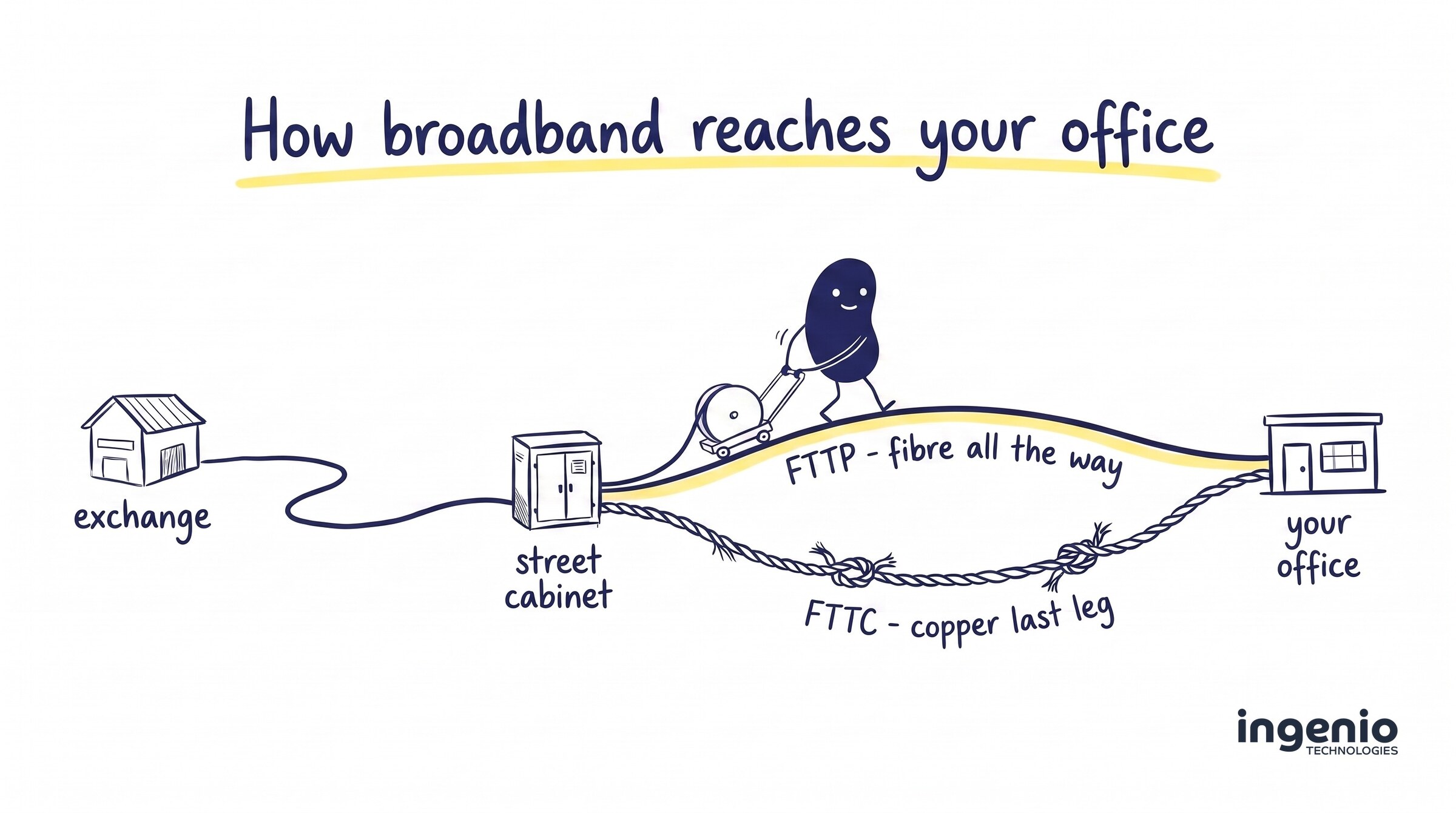
The internet is a global network of cables and data centres; your broadband is your own connection to the internet, a private slip road onto it. In the UK, that journey is surprisingly physical. A line runs from a telephone exchange, under the pavement to a green cabinet in your street, and on into your building.
There are different types of broadband connections, and the name mostly tells you how far the fibre optic broadband line reaches:
| Type of broadband | What it means for you |
|---|---|
| Fibre to the Cabinet (FTTC) | The line is fibre as far as the green cabinet in your street, then the old copper phone line covers the final stretch. Speeds are respectable but drop the further you are from the cabinet. |
| Fibre to the Premises (FTTP) | The line is fibre all the way into your building. This is full fibre broadband: faster, far more reliable, and the one to choose where available. |
Older buildings may still be on ADSL (asymmetric digital subscriber line), which runs entirely over the copper phone lines that used to connect every office in the country. That copper network is being retired as part of the UK’s analogue phone switch-off, so if a quote mentions ADSL, treat it as a stopgap rather than a plan.
Broadband technology has moved quickly here. Ofcom’s latest Connected Nations update found that 82% of UK premises can now get FTTP, and broadband speeds keep climbing year on year. If FTTP is available at your address, there is rarely a good reason for a business to choose anything else.
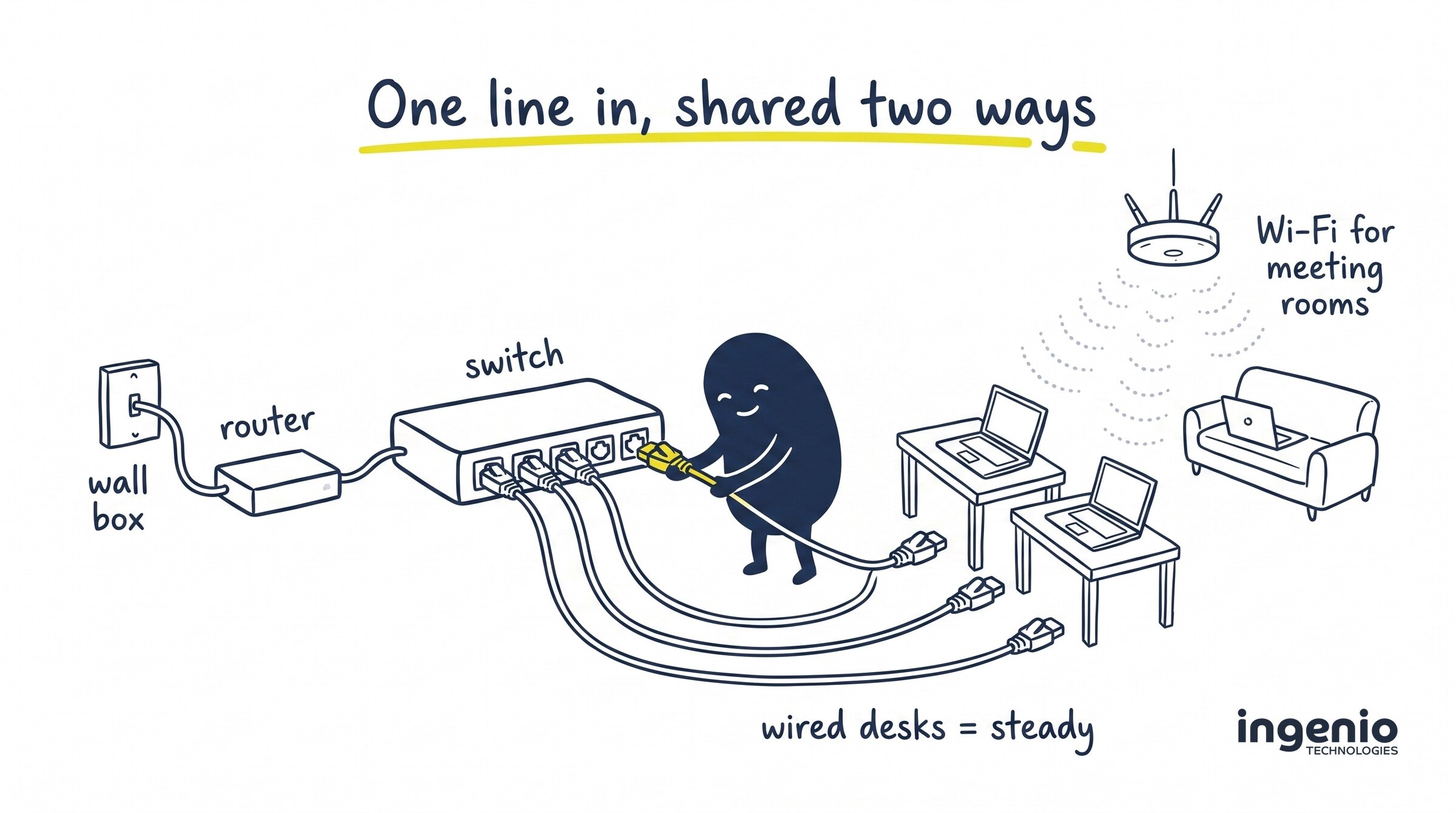
Whichever type of broadband you order, it ends the same way: a small box on the wall where the line terminates, with a router plugged into it. Everything beyond that box is your own network, and how the connection travels from there to your computers is a separate decision entirely; one that matters more than most businesses realise.
So what does Wi-Fi actually do?
Once the router is in, you need some way to deliver internet to the laptops, desktops and phones your team actually uses. There are only two options: plug in with a cable, or go wireless. WiFi allows devices to use the internet wirelessly: the signal from your router travels through the air as radio waves, the same way your smart TV picks up a film at home without a wire.
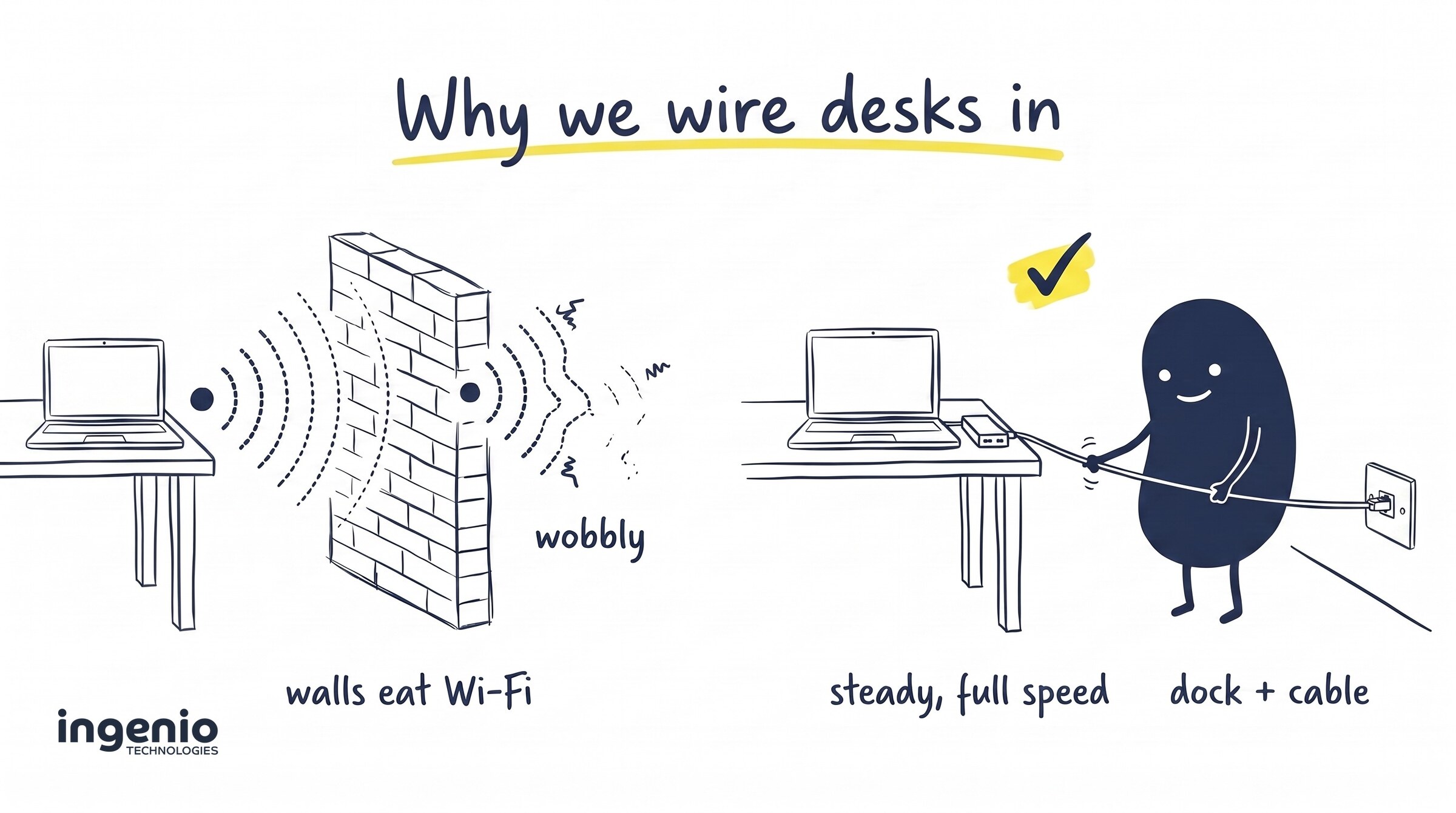
Wi-Fi is brilliant, but it is physics, not magic. The Wi-Fi signal weakens with distance from the router, and walls, floors, microwave ovens and neighbouring networks all chip away at it. That is why a connection that feels instant in one room can crawl in the far meeting room, even though the line into the building has not changed at all.
In an office, the signal normally comes from access points mounted on the ceiling rather than a single box in the corner. Each access point rebroadcasts the same connection so laptops can roam the building freely. But everyone is still using the internet through the same line, and every device still has to access your broadband through it: adding more kit does not create more internet.
This is also why you can technically have Wi-Fi without broadband. Your devices would connect to it and see each other, but you would have no internet connection without broadband behind it: no way to access the internet, no email, nothing.
Broadband vs WiFi: why the difference matters
The differences between broadband and Wi-Fi stop being academic the moment something goes wrong. Broadband provides the supply; your cables and access points share it out. Keep those roles separate in your head and the everyday frustrations start making sense.
Slow internet? Run a speed test twice: once right beside the access point, and once at the desk where things feel slow. Fast there but slow at the desk means the line is fine and the network inside is struggling. Slow everywhere, even on a cable, means it is time to call your provider.
Thinking of upgrading? Does faster broadband mean better Wi-Fi? Usually not. When businesses compare broadband packages, they are shopping for a bigger pipe into the building; that does nothing about weak coverage inside. Plenty of firms pay for high-speed broadband and then lose half of it indoors. The faster your broadband, the more you waste if the network inside cannot keep up: a fast internet connection is only as good as the last ten metres.
Wired or wireless? Connecting your computers properly
The last piece is how your computers connect to your broadband, and it is the part businesses are least often given advice on. Both options get your devices to the internet, but they are not equal: hardwiring fixed desks is the standard that we, and most network engineers, work to.
The setup is simple. A network switch plugs into your router, and an ethernet cable runs from the switch to each desk, usually finishing at a neat socket in the wall or floor. A wired connection does not care about walls, interference or how many people are in the building; every desk gets the same steady connection at full speed, all day.
One wrinkle for modern laptops: many, including the Apple MacBook Pro, no longer have a network port at all, so each desk needs a USB-C docking station or adapter to take the cable. It is a modest cost next to the productivity a stable connection buys back.
Our standing recommendation is simple: wire in anyone who sits at a fixed desk, and save the wireless for everything that genuinely moves. Wi-Fi is great for meeting rooms, visitors, phones and laptops on the move. Used that way, the two stop competing and start complementing each other.
Moving office? Sort the connection first
If you are relocating, connectivity belongs at the top of the checklist. A new broadband connection routinely takes four to six weeks to install, longer if the building needs new ducting, and an office with no internet access is an expensive place to sit. Check early whether the new address can access broadband over FTTP, start comparing broadband deals as soon as you have signed, and order the broadband service well before moving day.
A move is also the cheapest moment you will ever get to install network cabling, while floors are up and decorators are booked anyway; retrofitting cables into a finished office costs far more. Our IT office relocation guide walks through the full checklist, connectivity included.
How we help
We are an IT support company based in Brighton, and we manage internet connectivity for small and medium businesses across Sussex and the South East. That covers the whole journey: choosing the right connection for the building, network cabling and switches, and designing and installing Ubiquiti UniFi access points so the coverage you do use is fast everywhere, not just next to the kit.
If you are planning a move, or you suspect you are paying for more broadband than your office ever sees, we will happily look at your internet setup and tell you in plain English what is worth changing. Details are on our managed connectivity page.
Frequently asked questions
Can you connect to the internet without broadband?
Yes, in a few ways. Mobile broadband uses the 4G or 5G phone network instead of a fixed line, and satellite broadband (sometimes sold as wireless broadband) delivers the connection over the air. Both are handy as backups or for temporary offices, but a fixed line is faster and more dependable for day-to-day work.
Can you have broadband without WiFi?
Absolutely, and plenty of security-conscious offices do. Plug your computers in at the desk and you can turn the access points off entirely; your connection works exactly the same. It is a convenience layered on top, not a requirement.
What is the difference between Wi-Fi and the internet?
The internet is the global network your business connects to. Broadband allows you to access it from your building, and Wi-Fi covers the final few metres between your equipment and your devices. People often say wireless internet when they mean Wi-Fi, which keeps the confusion alive. Both give you access to the internet; only one of them is the internet connection itself.
Is a wired connection really better than Wi-Fi?
For anything that stays on a desk, yes. A wired broadband connection is more consistent, faster in practice and immune to interference. The technology has improved enormously (modern standards such as Wi-Fi 6 are far better in busy offices), but physics still applies: shared airwaves will never beat a dedicated line for reliability.
Can I get fibre broadband at my new office?
Increasingly likely: FTTP now covers 82% of UK premises according to Ofcom’s Connected Nations research. Availability is postcode-specific though, so check before signing a lease. If FTTP has not reached the street yet, FTTC broadband offers a workable interim (as does Virgin Media’s cable broadband where present), and we can help you plan around it.
Final thought
Broadband gets the internet to your building; cabling and good access points carry it the final few metres. Different jobs, different failure modes, and each deserves its own attention, especially with an office move on the horizon.
If any of this has raised questions about your own setup, we are happy to talk it through.