
How to spot a phishing email
The tell-tale signs, real examples, and exactly what to do if someone clicks.
Phishing is the scam email that tries to make you click a link, open an attachment or hand over a password, and it starts most small business breaches. AI has made the fakes fluent, so the old advice about bad spelling no longer protects you.
Posted on Google
 Daniel Flack22 September 2026
 Excellent comms from Joel, the issue was sorted quickly and effectively.Posted on Google
 Steve Burge9 September 2026As a long term client of Computer-eyez, I would like to say that at every occasion that I've had to use or call in for they're help, that this has always been done in a very efficient and professional way. Prestige Products - EastbournePosted on Google
 ken benham1 September 2026"All very good and very professional !"Posted on Google
 Tim Williams6 August 2026Great help as always from Cameron and team.Posted on Google
 Helen Stephens | Drewberry21 July 2026Following my query Joel was very prompt and efficient as always to resolve, many thanks Joel!Posted on Google
 Beth Rigby4 June 2026Joel was so persistent with helping me get a VPN set up on my machine - he was a total Godsend! Finally up and running, and he's been great every step of the wayPosted on Google
 Pamela Boyle4 June 2026Great - Working from home and needed help for a very simple problem but I didn't know how to solve it. Phone was answered promptly early in the morning and Gavin sorted the issue in minutes. Thanks so much.Posted on Google
 Mike Ellicock15 May 2026Great support once again from Leanna.Posted on Google
 Eifion Davies11 May 2026a big thank you to and especially Jo for doing a great job on fixing the teams appPosted on Google
 Mark Beaumont5 May 2026Always a pleasure to deal with the ingenio team. The only problem is, it’s always when there’s a problem. :)). But they do sort the problem.!
Ask us about phishing training
Enter your details and we will call you back to talk through training and email protection for your team.
You will speak to our Brighton-based team, rated 4.9 stars on Google.
Five checks that catch most phishing emails
How AI has changed phishing
The National Cyber Security Centre's assessment of AI and the cyber threat is blunt: AI now gives criminals of every skill level the ability to produce convincing phishing, and the old tells are disappearing.
Spot the tells: the fake invoice
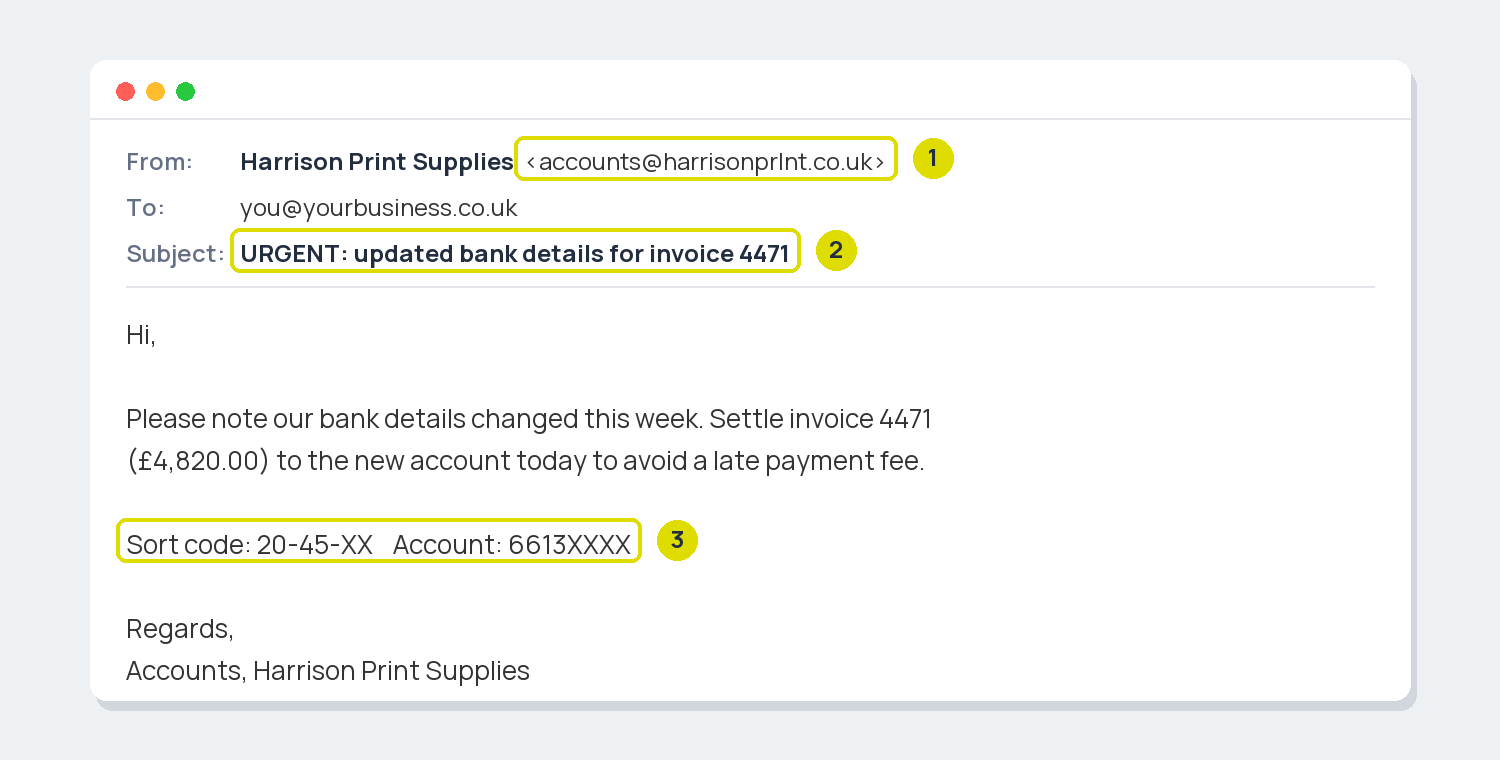
1 A lookalike sender domain, print spelt with a lowercase L. 2 Urgency in the subject line. 3 New bank details, which are the real goal.
What phishing looks like in 2026
Spot the tells: the boss message
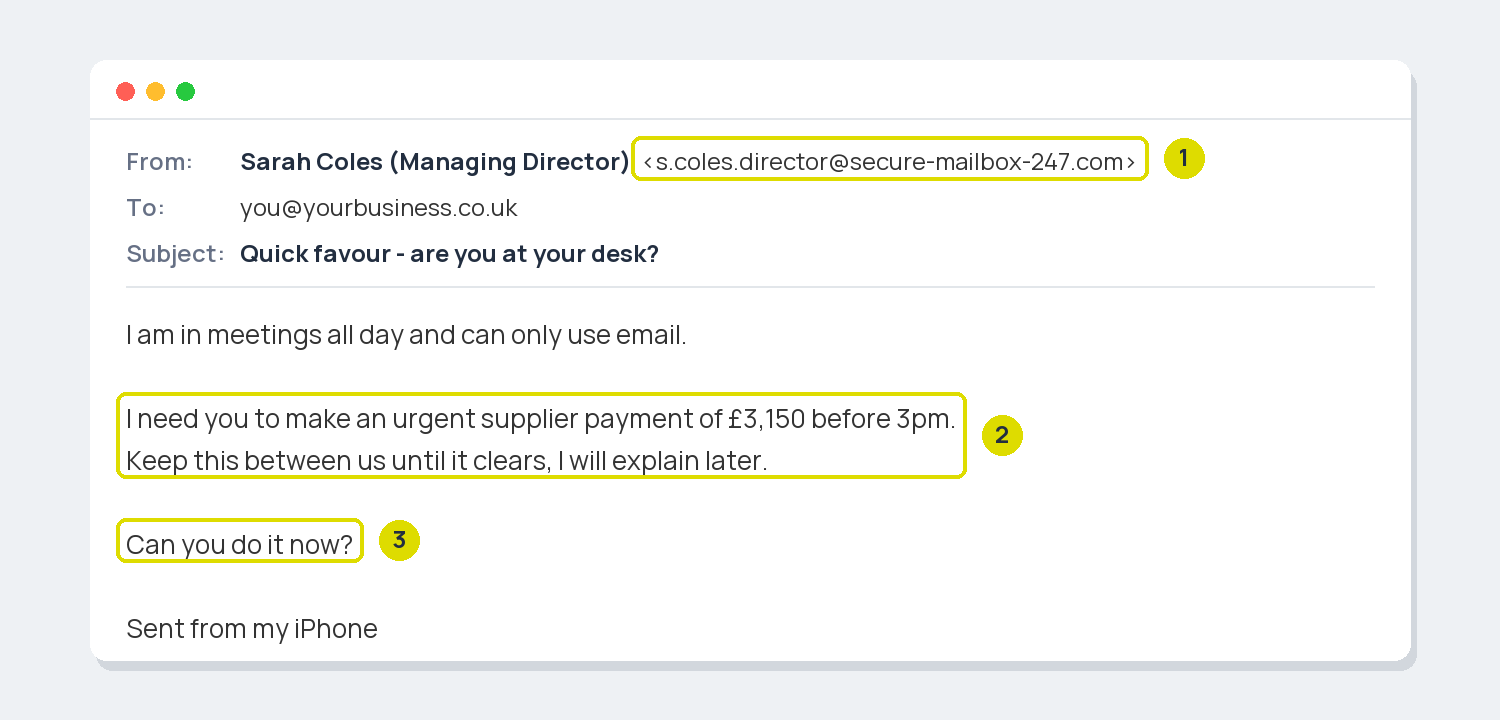
1 An outside email address, not your company domain. 2 Urgency plus secrecy, so you do not check with a colleague. 3 Pressure to act immediately.
If someone has already clicked
Train your team to protect yourself from phishing
Spotting scams is a habit, and habits need practice. We run phishing awareness training for Sussex businesses, and our support clients get security courses for the whole team on Lightbulb, our training portal.
This guide covers spotting and responding. For locking down the email system itself, read our secure email guide.
Frequently asked questions
What is phishing?
Phishing is any message designed to trick you into giving away personal information, a password or a payment. Email is the biggest channel, but the same scams arrive by text message and phone call.
We use Microsoft 365. Does that stop phishing?
It filters a lot out, but no filter catches everything, and the most convincing scams are written to sail through. Settings reduce the volume; trained people catch the rest.
What is the difference between phishing and spear phishing?
Phishing is sent in bulk to anyone. Spear phishing is aimed at a named person, usually using details about your company to sound convincing, and it is far harder to spot. Our comparison explains both.
Should we report phishing emails even when nobody clicked?
Yes. Forward them to report@phishing.gov.uk. Reports take scam sites down and protect the next business, and it takes ten seconds.
Get new guides by email
One short email when a new guide goes live, and nothing else.